One of the benefits of having YouTube Premium Membership is offline viewing of YouTube videos. This means, you can download YouTube videos to watch it anytime (even when there is no internet connection). Video Tutorial Showing How-to Download YouTube Videos How-to Download YouTube Videos On Your Computer Visit youtube.com from your signed in YouTube Premium… Continue reading How-to Download YouTube Videos for YouTube Premium Members
Tag: how to
How-to Link Google Business Profile with Google Ads Account

Linking Google products with Google Ads offers you the full power of Google’s Advertisement platform, also its global reach when you link all products you use for your business, be it, the latest 2024 Google Business Profile (formerly Google My Business), Google Analytics, YouTube, Search Console or another Google product. Video Tutorial for Linking Google… Continue reading How-to Link Google Business Profile with Google Ads Account
Website Images Disappeared from Google Search Results Page?
You wake up, fill up with breakfast and your favorite caffè latte, open your laptop to fulfill orders or reply back to your messages, but you notice something doesn’t seem right, perhaps there are no orders to fulfil, or orders are less than usual. You immidiately check Google Search Results Page (SERP), but you can’t… Continue reading Website Images Disappeared from Google Search Results Page?
How-To Fix INP issue: longer than 200ms
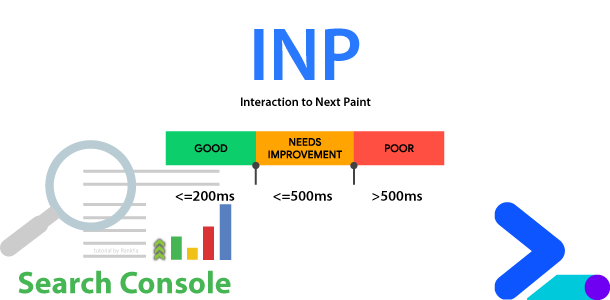
Interaction to Next Paint (INP) is now a Core Web Vital metric that replaced First Input Delay (FID). INP assesses responsiveness using data from the Event Timing API. INP observes the latency of all interactions a user has made with the page, and reports a single value. A low INP score means the page was… Continue reading How-To Fix INP issue: longer than 200ms
How to Fix Blocked by robots.txt Errors
Search engines find information through crawling (which means they request / fetch a URL) to then analyze what they find on the URL. robots.txt rules should only be used to control the search engine crawling process but not indexing process. This means, most Search Console blocked by robots.txt errors arise due to incorrect rules used… Continue reading How to Fix Blocked by robots.txt Errors
How to Fix Page with Redirect Errors
Latest Page indexing reports in Google Search Console has grouped various errors so that it is easier for website owners to fix issues. Page with redirect basically means that Google is seeing a URL but when it tried to fetch and index it, Google is being redirected to a different URL causing page with redirect… Continue reading How to Fix Page with Redirect Errors
Page Indexing
New Google Search Console Page Indexing reports with Excluded and Error issues are now grouped into the status Not indexed. Google Search Console now shows you various issues a website may experience that can affect indexing of certain URLs. And because RankYa has been maintaining full course and how-to videos related to Google Search Console,… Continue reading Page Indexing
How to Remove an Image from Google
It is often confusing to understand Google’s policies when it comes to content to be removed from Google search results including Google Image Search Engine. Accordingly, I’m creating new tutorials for getting rid of content that appears through Google (or Google services). First, to be able to remove personal photo or image that is hosted… Continue reading How to Remove an Image from Google