
The Pressidium Cookie Consent plugin is a free WordPress plugin designed to help websites built on WordPress comply with cookie consent regulations, such as the General Data Protection Regulation (GDPR) and the ePrivacy Directive (Cookie Law). It ensures that websites inform users about the use of cookies and obtain their consent before storing or accessing any non-essential cookies.
Video Tutorial for Setting Up Pressidium Cookie Consent Plugin
Key Features of the Pressidium Cookie Consent Plugin
Customizable Cookie Banner – Allows you to create a cookie consent banner that matches your website’s design. Options to customize text, colors, and placement of the banner.
Granular Consent Options – Provides users with the ability to accept or reject different categories of cookies (e.g., necessary, analytics, marketing).
Automatic Blocking of Cookies – Blocks third-party scripts and cookies until the user provides consent.
Compliance with Google Consent Mode v2 (including EU GDPR and CCPA) – Ensures your website meets the requirements of major privacy regulations.
User-Friendly Interface – Easy-to-use settings for configuring the plugin without needing technical expertise.
Logging and Reporting – Keeps records of user consent for compliance purposes.
Multilingual Support – Supports multiple languages to cater to a global audience.
How to Use the Plugin
Install and Activate – Install the Pressidium Cookie Consent plugin from the WordPress plugin repository or upload it manually. Activate the plugin on your WordPress site.
Configure Settings – Go to the plugin settings in your WordPress dashboard. Customize the cookie banner, consent options, and cookie policy.
Test the Banner – Preview the cookie consent banner on your website to ensure it displays correctly. Use Google Tag Assistance to connect your website.
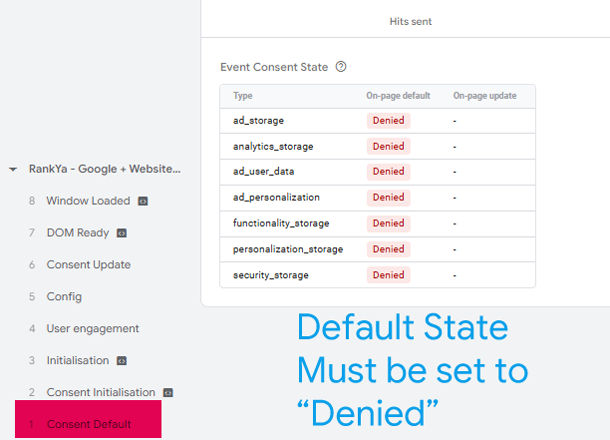
Monitor Compliance – Use the plugin’s logging feature to track user consent and ensure compliance with regulations.
RankYa Tip – as your consent records become large, you can download it to your local computer and then clear consent records so that your wordpress site loads better.
How to Block Scripts
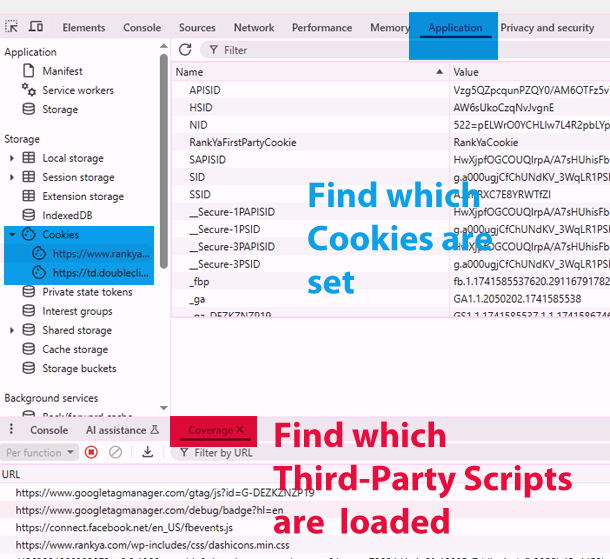
Before you block scripts, it is wise to find out which cookies are setup on your website. You can use various Cookie Scanner Tools online (simply Google). Or you can use Web Developer Toolbar (press F12 on your keyboard).
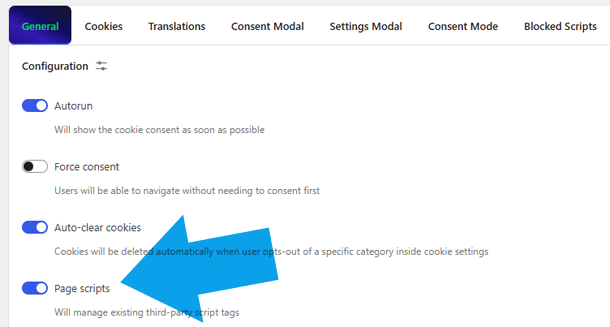
Under “General Settings” toggle “Page scripts” on.
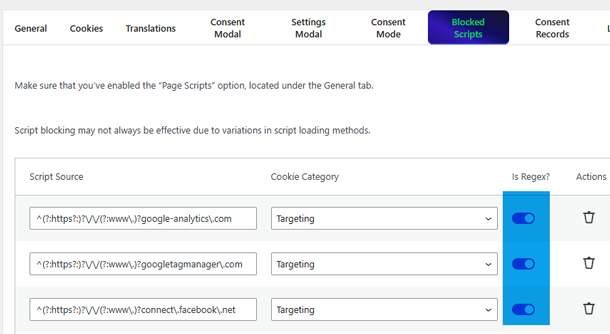
Then, Enable Regex and insert the script and its URL you want to block. For example:
Google Analytics
^(?:https?:)?\/\/(?:www\.)?google-analytics\.com
Google Tag Manager
^(?:https?:)?\/\/(?:www\.)?googletagmanager\.com
Facebook Meta Pixel
^(?:https?:)?\/\/(?:www\.)?connect\.facebook\.net
Optional: (this plugin will block scripts automatically) but also provides an option to edit