Here you’ll find definitive 2026 blueprint for e-commerce optimization, engineered specifically for Shopify store owners wanting actionable steps for optimizing their stores for Agentic Storefronts and AI Discovery Engines, above all else, its created for those who refuse to let their product catalogs get left behind by the rapidly advancing agentic web ecosystem.
1. Baseline Eligibility & Legal Requirements
Before AI agents (like ChatGPT, Gemini, Google-Extended, and Copilot) can discover and securely interact with your storefront via Shopify’s Universal Commerce Protocol, your store infrastructure must satisfy specific core trust elements as well as have requirements for Shopify Category inclusion as well as Agentic Storefronts Supplemental Terms of Service.
Mandatory Requirements for Shopify Catalog Inclusion:
- Public Trust Pages: You must populate all native legal fields. Go to
Settings > Legaland create legally compliant, active documents for: Terms of Service, Privacy Policy, Shipping Policy, and Refund/Return Rules. Missing fields disqualify the storefront from automated background crawling. - Account Configurations: Your store layout cannot enforce mandatory customer log-ins before accessing checkouts. AI agents process transactions via headless background APIs; they cannot bypass credential gates.
- Financial Compliance: Active integration with Shopify Payments is required to support in-app direct execution of transactions inside conversational surfaces. If using Google Merchant listings? Shopify Merchant Addendum
Video Tutorial: Shopify Agentic Storefronts 2026: SEO Strategy for Gemini AI Mode & ChatGPT
2. Catalog Structure & Asset Optimization
AI Discovery agents do not look at web visuals like a human, they analyze and render semantic hierarchies and code.

A. Specific AI Collections vs. Human Navigations
- Avoid dumping items into single comprehensive blocks or using generic, trend-based Collection definitions (e.g., “Summer Vibes”).
- Build structural, flat-architecture collections bound tightly to specific product categories. Use strict logical rules based on native product variables rather than front-end tags.
B. Precision Image Optimization Strategy
One of the most under utilized part of Shopify SEO are images. Surely, having HD images are a great start. But images should be optimized not just for file name, or even weight, but for absolute asset consistency:
- Dimensions: Standardize on exactly
1200pxwide as a baseline. Square orientations (1200px x 1200px) scale ideally across AI multimodal canvas formats. - Usability and Search Traffic: Image file names play an important role in understanding content for search engines, instead of image file name being 12234product.jpg, or black-backpack.png etc. it can be more meaningful, for example: black-waterproof-commuter-backpack-for-laptops.png
- Visual Search Accessibility: Write objective, data-dense image Alt Texts (Alternative Text for Images) instead of marketing slogans. For example: Use “Close-up of matte black full-grain leather laptop backpack showing weather-sealed steel zippers” instead of “Nomad Pack Best Selling Bag”.
3. Granular Product Details (The Baseline Layer)
Traditional attributes still act as foundational ranking triggers. Ensure these standard variables are completely filled out across your entire inventory catalog:
| Field | AI Optimization Rule |
|---|---|
| Product Title | Keep it punchy, clean, and recognizable for storefront presentation and conversion metrics. |
| Description | Include clear brand storytelling, sizing variables, layout features, and value propositions for standard web shoppers. |
| Product Type | Assign specific parameters from the deepest sub-tier of Shopify’s Standard Product Taxonomy (e.g., Apparel > Clothing > Activewear) rather than custom text inputs. Collections, product Category and product Type are NOT the same things in Shopify, this means, use all of them strategically. |
| Tags | Utilize consistently for backend site organization and internal filtering constraints. Add up-to 5 meaningful tags related to the product. |
4. Deep Machine Optimization: Custom Metafield Routing
For boutique operations running small catalogs (up to 50 items), you can implement a high-leverage “Dual-Layer” optimization framework. For massive multi-thousand item operations, this approach can and should be automated or restricted to top sellers due to high data maintenance requirements.
The Logic: This architecture separates what humans see on your website from what AI algorithms read through the global index layer, avoiding the need to clutter your store’s branding with keyword-stuffed titles.
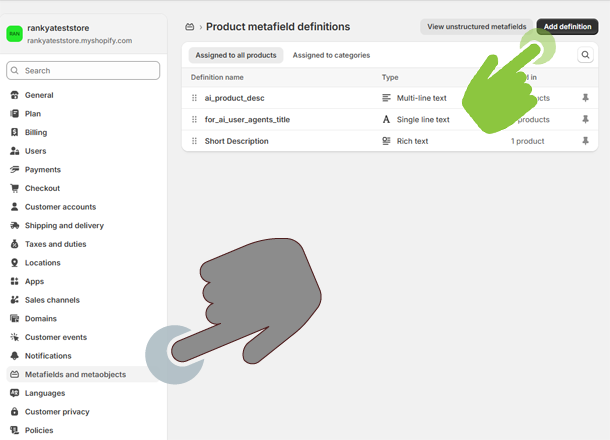
Step-by-Step Configuration Implementation:
- Step 1: Create Metafield Definitions. Go to
Settings > Metafields and metaobjects
 > Products
. Select Add definition. Create a field titledAI Optimized Title(Type: Single line text) and a second field namedAI Technical Specs(Type: Multi-line text). - Step 2: Populate Clean Attributes. Open an individual item in your product manager. Scroll to the bottom Metafield workspace. Populate the fields with unbloated, high-intent technical values:
- AI Optimized Title Field:
Unisex Matte Black Full-Grain Leather Laptop Backpack (15-Inch, Water-Resistant) - AI Technical Specs Field: Enter a clean text list with strict system parameters (e.g., materials, capacities, exact measurements) completely free of decorative HTML tags. For example:
- Material: 100% Full-grain vegetable-tanned cowhide leather
- Capacity: 22 Liters
- Hardware: YKK weather-sealed zippers
- Compartments: Padded 15.6" laptop sleeve, internal RFID blocking pocket - AI Optimized Title Field:
- Step 3: Access Shopify Catalog Mapping. Navigate into your global marketplace settings or open the **Agentic Storefronts** panel to locate the native data transformation controls. URL example:
- Step 4: Reroute Standard Data Channels. Open the dropdown selections to override default system distribution variables:
- For the Product Title channel selection dropdown: Switch the routing target from Default Product Title to
custom.ai_optimized_title. - For the Product Description channel selection dropdown: Switch the routing target from Default Product Description to your custom
custom.ai_technical_specs.
- For the Product Title channel selection dropdown: Switch the routing target from Default Product Title to
admin.shopify.com/store/YOURSTORENAME/mappings/shopify-catalog-mapping

Shopify SEO for Gemini and Google AI Mode
eCommerce landscape is changing because major players like Google is heavily guiding these changes by introducing new Artificial Intelligence features. Shopify seeing the importance of these changes have leaped ahead of other popular Content Management System like WooCommerce by introducing Shopify Catelog available to all users.
As a store owner, you must be prepared now so that when more and more people purchase products through these AI agents, your products are what they see because you have search engine optimized your shopify store. This guide will definitely help you to get better results. Download PDF version here: Shopify Store AI SEO 2026 (.PDF)
5. Advanced Developer Layer: Automated Liquid Fallbacks for Large Catalogs
For stores managing massive catalogs containing hundreds or thousands of products, manually mapping custom metafields line-by-line is a data maintenance nightmare. Instead of relying solely on manual administration, advanced users and theme developers can inject a dynamic logic layer directly into their theme architecture.
The template code below establishes a smart fallback system: If a manual AI title override exists, it uses it; otherwise, it dynamically generates an unbloated, attribute-dense title for the marketplace catalog streams using existing database properties like vendor, type, and variant titles.
{%- liquid
  comment
    AUTOMATED AI TITLE GENERATION ENGINE
    Checks for an explicit manual AI override first.
    Falls back to a semantic layout string if the field is empty.
  endcomment
  if product.metafields.custom.ai_optimized_title.value != blank
    assign ai_title = product.metafields.custom.ai_optimized_title.value
  else
    comment
      Dynamically build a data-rich descriptive title using product properties
    endcomment
    assign product_type = product.type | default: ""
    assign vendor = product.vendor | default: ""
    assign core_title = product.title
    comment
      Extract the first variant options (e.g., Color/Size) to add granular depth
    endcomment
    assign first_variant = product.variants.first
    assign variant_details = ""
    if first_variant and first_variant.title != "Default Title"
      assign variant_details = first_variant.title | prepend: " - "
    endif
    assign ai_title = vendor | append: " " | append: core_title | append: " " | append: product_type | append: variant_details | strip
  endif
-%}
{% comment %} Output clean, HTML-escaped string safe for the catalog data pipeline {% endcomment %}
{{ ai_title | escape }}
Why This Programmatic Architecture Excels:
- Zero Administration Overhead: Large catalogs instantly receive optimized, long-tail search criteria without touching a single admin text box.
- Context Enrichment: It transforms a vague storefront title like “The Nomad Pack” into a highly clear data string: “RankYa The Nomad Pack Backpack – Matte Black / 15-Inch” inside the syndication feed.
- Clean API Execution: By piping through Liquid logic directly on the collection or feed layout level, you avoid running heavy JavaScript mutation files or paying for third-party automated feed apps.
Master these techniques and the dual-layer framework to ensure your store is perfectly built for human conversions on the front-end, and flawlessly optimized for AI discovery protocols on the back end.
Frequently Asked Questions
What is the difference between traditional Shopify SEO and AI SEO?
Traditional SEO focuses on optimizing your storefront layout, HTML tags, and keywords so that search engine crawlers can index your pages for human shoppers to browse. AI SEO, or optimizing for Agentic Storefronts, focuses on structuring your backend data layers (such as deep taxonomy mapping and custom metafields) so that LLMs like ChatGPT and Google Gemini can natively parse, understand, and directly recommend your products within conversational interfaces.
Will Google AI Mode index my Shopify products automatically if I have good standard SEO?
Yes, standard high-quality SEO allows AI models to scrape your web content, but it leaves your store vulnerable to scraping lag and data misinterpretation. Activating Shopify's Agentic Storefronts and Catalog Mapping routes your product attributes directly into a live API sync layer, providing AI engines with millisecond-accurate inventory levels, variant options, and a secure pathway for customers to execute direct checkouts within the AI chat itself.
Why shouldn't I use standard HTML formatting tags like break lines inside my AI technical description metafields?
AI discovery engines consume raw, unbloated text strings and structured key-value pairs rather than styled visual browser layouts. Including HTML formatting tags like break sequences within your custom backend description fields can corrupt the data stream, causing the API to deliver literal syntax strings or trigger formatting errors that prevent the artificial intelligence from cleanly parsing your product specifications.
How can large e-commerce stores scale this framework without manually mapping thousands of products?
For large inventories where manual data entry is highly inefficient, you can implement a programmatic fallback engine directly into your theme architecture using liquid logic. By writing a liquid conditional loop, you can instruct Shopify to check if a manual AI override title exists first; if the field is blank, the server automatically string-concatenates your existing database fields, such as Vendor, Title, Product Type, and Variant details, into a descriptive, machine-ready title on the fly.
What are the baseline administrative requirements to be included in the Shopify Catalog layer?
To be automatically included in Shopify Catalog, your store and products must meet the following eligibility requirements:
- Your store must comply with Shopify's Terms of Service and Acceptable Use Policy.
- Your store must be on the Starter plan or higher, and your store can't be password-protected.
- Your products must have a title and at least 1 product image.
- Your products must have a price over $0. Free products aren't included in Shopify Catalog.
- Your products must ship to the United States or Canada.
- Your products must be published to your online store, Hydrogen, or Headless channels.
- If you're using Hydrogen or Headless channels, then you must use the correct format for routes to be included in Shopify Catalog.
- If you're using the Shopify Agentic plan, which doesn't include a Shopify online store, then your products must include the external product URL.
- Your products must be published with an identifiable product URL.
- Your products can't have Unlisted status or be hidden from search engines.
- Your products can't contain sensitive content, such as mature content.