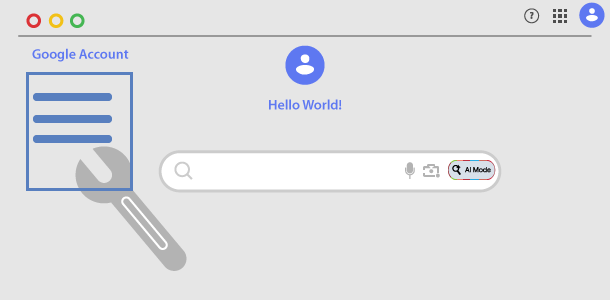
Every time you search, watch a YouTube video, or ask Google Assistant or prompt Gemini, Google records that action, everything is saved in one central place "Your Google Account". That collection of records is called your Google My Activity.
The good news? Google provides thorough Activity Controls. You can easily view, delete, pause this tracking, or even set it to auto-delete. This post walks you through exactly how to manage Google My Activity history step by step, so you can stay in better control of your privacy.
To better control your activity history, understand that Google stores your Activity history seperately according to which Google Products or Services that you actually use. You might be surprised as to how much data and how far back your activity records go.
Understanding Google Dashboard
Here in Google Dashboard you can see a summary of Google services that you use, and the data saved in your Google Account. Through this dashboard you can quickly download a particular service data or even change its settings. For example: Google Calender data can be downloaded and even access the Calender Setting.
Understanding Your Digital Footprint Dashboard
The Data and privacy section dashboard operates as the central command center for your account data. It aggregates all the privacy related actions while signed in, allowing you to view, control, delete or adjust the information recorded (including Data sharing with Third-party apps and services, Personalised ads and Topics).
Web and App Activity Settings
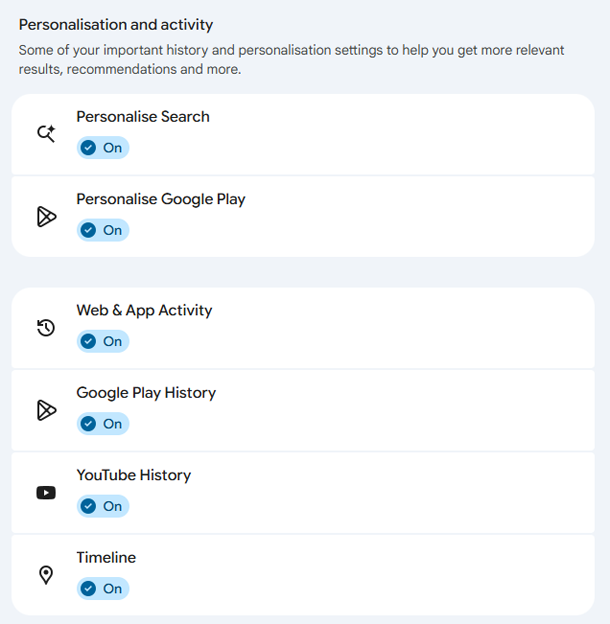
Your web and app activity encompasses search queries, Chrome browsing history, and interactions with connected apps. Keeping this active provides highly personalized search results and faster recommendations. However, you might prefer to clear your activity history regularly to keep your profile clean and limit tracking.
Other Activity: it is important to note that each Google account is different, the history Google keeps on a particular Google account is based on “how you use Google products and services”. Accordingly, you must double check this section called Other Activity to see more activity controls not available in Web & App activity.
Timeline and YouTube History Logging
Google Maps although useful, tracks many things like the routes you travel, which proves useful for the Maps Timeline feature but may raise personal privacy concerns. When Timeline is on, even when Google apps aren’t in use, your precise device location is regularly saved to your device. Note: you can turn off Timeline Backup (to manage backup for a specific device, go to Timeline in the Google Maps app).
Similarly, YouTube history records what you search for and watch. If you frequently watch videos (or listen to music), those specific views and preferences are permanently stored in your account unless you proactively adjust your privacy controls. Furthermore: since Google stores your YouTube interactions such as Video likes and dislikes, Your YouTube comments and other interactions, you may want to analyze them for full control.
How to Delete Only Search Services History
How to Delete ALL Chrome Data from Google Account
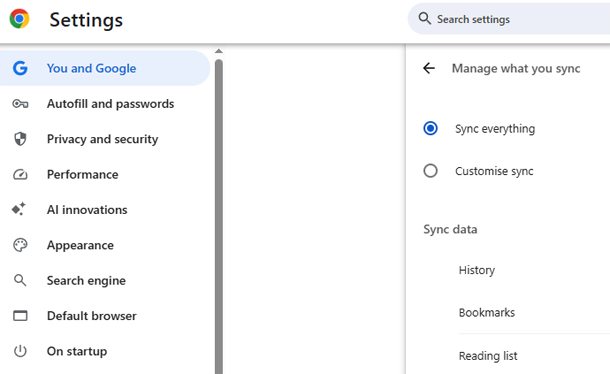
When you sign in to Chrome, you can save your bookmarks, history, passwords and other settings in your Google Account. This saved data can be used on any device. You can choose what info is saved in your Google Account.
 Chrome data in your account
Video Tutorial: How to Delete ALL Google Chrome History & Activity (Permanently)
Why You Should Check Your Google Activity Logs
Your activity history helps Google personalize recommendations, improve search results, and remember what you’ve seen. But maybe you share a device, want less targeted ads, or simply prefer a cleaner digital life. Checking what’s stored gives you transparency. Regular cleanups also reduce the amount of data attached to your account.
- See past searches you forgot about
- Remove accidental voice commands or embarrassing queries
- Stop location Timeline history from building unnecessary trails
- Prevent old YouTube watch or interaction history from influencing recommendations
How to Access and Manage Google My Activity History
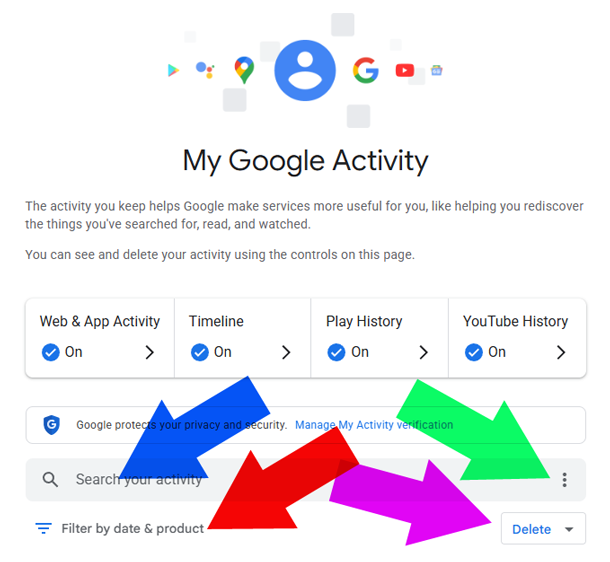
Open any browser and go to myactivity.google.com/myactivity while signed into your Google account. You’ll see a timeline of your web & app activity, location history, YouTube history, and voice commands. From here you can delete individual items, delete entire days, or set automatic deletion rules.
Delete Individual Items or Entire Batches
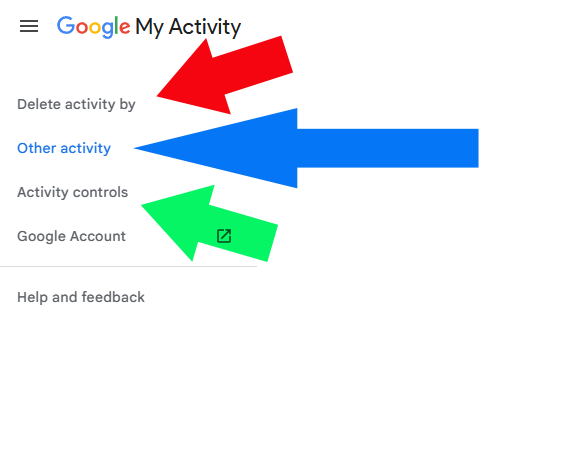
To remove a specific search: find the entry, click the three-dot menu, and select Delete. To remove multiple items at once: click Delete activity by on the left sidebar, then choose a date range like “Last hour”, “Last day”, or “All time”. You can also filter by product (e.g., only delete YouTube history but keep web searches).
Set Auto-Deletion for Web & App Activity
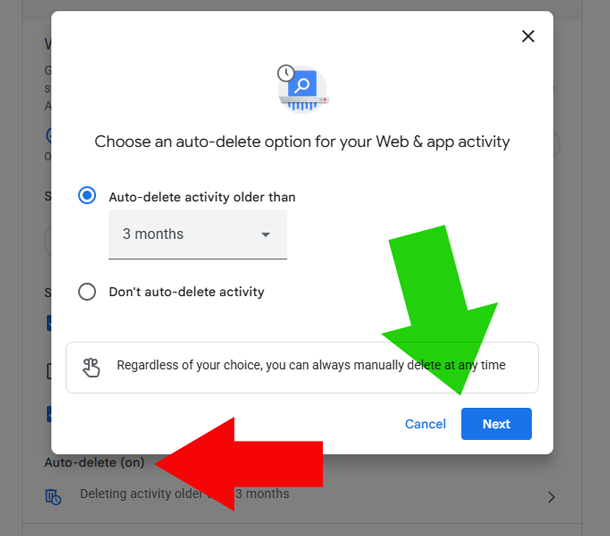
Instead of manually cleaning, you can tell Google to automatically delete history older than 3 months, 18 months, or 36 months. Go to Web & App Activity under the Activity controls menu, click Auto-delete, and pick your preferred timeline. This way your Google My Activity history never grows too old.
Pause or Turn Off Activity Tracking
If you don’t want Google storing future activity at all, you can pause tracking. From the left sidebar, click Activity controls. You’ll see toggles for:
- Play personalisation (searches and watches)
- Web & App Activity (searches, Maps, Play Store)
- Timeline (formerly Location) History (places you visit)
- YouTube History (searches and watches)
- Using Google Gemini? Here’s your Gemini Apps activity
Flip toggle to “Turn off”. Google will stop saving activity data moving forward.
Turning off doesn’t delete past data, you’ll need to do that separately using the deletion methods described above.
What About Incognito Mode and Other Devices?
Remember: Incognito mode only stops history from being saved on your local device if you are signed out. If you’re signed into your Google account while using Incognito, your activity may still be recorded in Google My Activity history. Always check your signed-in status. For shared computers, it’s better to delete browsing data after each session or use a guest profile. In fact, for security reasons, you should not login to your Google Account using public computers at some internet cafe (however, it is fairly safe to do so in Australian libraries).
Also, activity from your phone, tablet, and laptop all go into the same history log if you’re using the same Google account. Manage Google My Activity history from any device, and the changes apply everywhere.
Search Your History Like a Pro
Have you ever needed to find something you searched months ago but can’t remember the exact query? Use the search bar at the top of the myactivity.google.com page. Filter by product (like “Maps” or “News”), by date, or by keyword. It’s a lifesaver for finding that recipe, video you watched or article you lost.
Download a Copy of Your Activity
Some people prefer to keep an offline backup before deleting everything. Google Takeout (takeout.google.com) lets you download all your activity data as a .ZIP or .TGZ file format. Select Web & App Activity, choose file format (.zip or .tgz), and set a size limit. You’ll get an email when your archive is ready.

Take Back Control of Your Digital Footprint
You don’t need to be a privacy expert to manage Google My Activity history. Spend five minutes today reviewing what’s stored, delete what you don’t need, and adjust auto-delete settings to keep future history tidy. Your privacy is worth that small effort. Go ahead log in now to give your account a fresh start.
Frequently Asked Questions
Does deleting Google My Activity history also delete it from Google's servers?
Yes. When you use the delete functions on myactivity.google.com, Google removes that data from its servers. However, some anonymized or aggregated statistics might remain for internal system improvements, but personally identifiable information is deleted.
Will pausing Web & App Activity stop Google from personalizing ads?
Not entirely. Pausing Web & App Activity stops Google from using your searches and browsing data to personalize ads. But Google may still use other signals like your general location, device type, or the content of the website you're currently viewing to show relevant ads.
How long does Google keep my activity history by default?
By default, Google keeps Your Activity until you manually delete it. However, since Google introduced an auto-delete option, you can now set it to auto-delete, so if you never changed your settings, your history is kept forever unless you delete it or turn on auto-delete.
Can I manage Google My Activity history without signing into my account?
No. You must be signed into the Google account whose history you want to manage. If you're not signed in, Google cannot identify which data belongs to you. Use incognito mode or a private window only if you want to avoid saving local history on that device.
If I delete an activity item, will it disappear from all my devices?
Yes. Deletions are synced across all devices where you use the same Google account. For example, if you delete a YouTube search from your laptop's activity log, it will no longer appear in YouTube history on your phone or tablet either.

Amar You tube chlenel bondo hoye geche data of hoey geche eta ami chalu korte jay
You have to find out the reasons as to why Google closed your YouTube channel. Unless I know that, I can’t be of assistance. Is it due to Terms of Service
https://www.youtube.com/static?template=terms or Community Guidelines violation? https://www.youtube.com/intl/en-US/howyoutubeworks/our-policies/ or is it due to something else? Let us know so we can guide you accordingly.
This was really helpful blog as I had no idea you could delete activity by date or filter activity by product. Always thought it was all or nothing. Just cleaned tons of old searches in a few minutes thanks for the clear guide
Happy to help 🙂 Deleting everything or just by date is such a time-saver, right? Appreciate you stopping by and leaving a comment.
This is super helpful. I’ve always been a bit paranoid about what Google tracks, but your guide made it super simple to review and delete old activity. The video and screenshots really helped too. Thanks for the article.
You’re welcome Amanda. Sometimes the simplest fixes are the most overlooked especially when the Google Account’s menu options keep changing.