If your Google Tag is being blocked, or if you’re seeing an Issue in Google Chrome “An attribution OS trigger registration was ignored because the request was ineligible.” and you are wondering if you need to fix anything, then, let’s learn more about this issue.
Do You Need to Fix Anything?
In short, NO. Your Google tags are working correctly. Because this issue is related to app-related conversion tracking feature, since most websites aren’t Apps, your server isn’t set up for OS trigger registration, so the browser just ignores that specific part of the request (OS trigger registration). Your main Google tracking is working.
Simple Explanation
In 99.9% of cases, this is related to Tracking with Google Pixel (e.g. Google Analytics, Google Tag Manager, Google Ads Conversion Tracking, Cross Domain Tracking etc.)
Google Chrome Console Warning
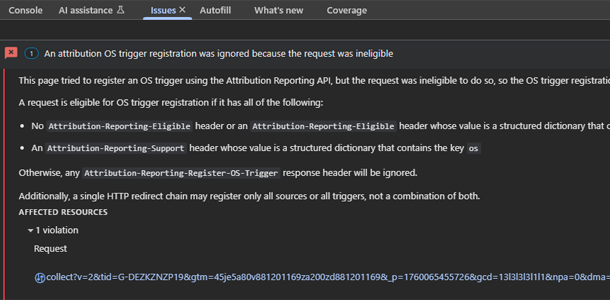
Below image shows an example in Chrome Web Dev Issues Panel.

The Source: The long URL you see is a data collection hit being sent to Google Analytics 4 (GA4). It’s how my website communicates page views, events, etc., to Google’s servers.
The Feature: The warning is about the Attribution Reporting API. This is a new browser technology, part of Google’s Privacy Sandbox initiative, designed to measure when an ad click (or view leads) to a conversion (like a purchase or a form submission) without using privacy-invasive third-party cookies.
The “OS Trigger”: This specific part of the API (OS stands for Operating System) is for tracking conversions that happen at the operating system level, most commonly mobile app installs. For example, a user clicks an ad on your website in their mobile browser, which then takes them to the Google Play Store or Apple App Store to install your app. The “OS Trigger” helps connect that website ad click to the final app installation.
The error message states that the GA4 request was “ineligible” because it was missing the required HTTP headers (Attribution-Reporting-Eligible and Attribution-Reporting-Support). Since those weren’t present, the browser simply ignored the request to register an OS trigger and logged this warning.
When Do You Need to Fix It?
As I’ve said, for most website owners there is nothing to fix, you can safely ignore this message.
You only need to care about this if you meet both of these conditions:
- You have a mobile app (Android or iOS).
- You are actively running ad campaigns on the web to drive installs of that mobile app.
If you don’t run ads for a mobile app, this API feature is irrelevant to you. The Google Tag script is just automatically checking if it can use this feature, since most websites aren’t meeting the above conditions, it can’t. Your standard website analytics (page views, contact form submissions, etc.) are not affected.
In Rare Circumstances: When Using Other Tracking Technologies
This issue may not always be related to Google Tags for some of you, if you have setup tracking differently without using Google Tags, these are the settings you may consider adding depending on your requirements.
Apache mod_headers:
Header set Attribution-Reporting-Support "os"
  Header set Attribution-Reporting-Eligible "trigger"
Nginx:
server {
    # ... your other server settings like listen, server_name, etc.
    add_header 'Attribution-Reporting-Support' 'os';
    add_header 'Attribution-Reporting-Eligible' 'trigger';
    # ... your other location blocks etc.
}
Android:
To make your app the “trigger” for the conversion, you need to use the Attribution Reporting API. Learn more about Attribution Reporting for mobile overview here. As that will involve writing native Android code.
Other Console Logs
Depending on which Google Product you are using for tracking, other console logs may also show __ogt_ads_datatos, __ogt_1p_data_v2, __ogt_cookie_settings or others which are all related to this specific issue.
Video Session: Final Thoughts
As always, if you aren’t advertising with Google Ads, focus on creating useful and helpful content, for more Google product related tutorials subscribe to RankYa YouTube channel here.