All Google’s Country Specific Search Engines has now permanently moved to https://www.google.com/ including google.co.in
How-to Access Google India Search Engine
Although www.google.co.in redirects to google.com, you can still search Google India, here’s how:
What Does gws_rd=cr Stand for in Google Search Engine?
- gws = Google Web Server
- rd = Redirect
- cr = Country
When you visit google.com/?gws_rd=cr through Chrome address bar, it simply means that Google’s web server redirected your browser based on your country. The gws_rd=cr parameter is added to the URL to enforce that this country-based redirect must happen. So, if you’re in India it will redirect your Chrome browser so that the search results are coming from India.
Why Did Google Make This Change?
Perhaps its becoming clear that the global power and reach of Google Systems is adequate enough to determine the location of the searcher. Particularly when we take in to account the usage of Google Apps in Smartphones.
Video Session: Changes to Google Search Engine for India
What Settings Are Available for Google Users in India?
Although you do not have to change anything because Google Systems will work out your current location and display results for India when you search Google. There are couple of settings you can adjust if you want precise control of how you use Google products including their search engine.
Google Chrome Settings
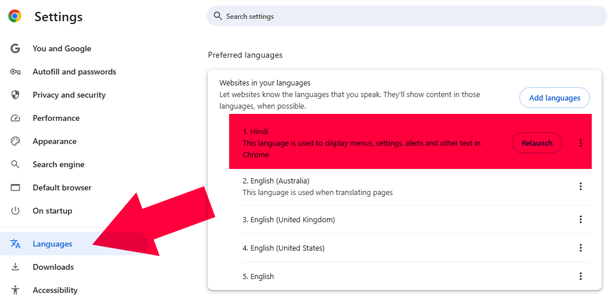 Ensure that your preferred language is setup correctly, be it English (India), Hindi, or Tamil. Also your chosen language is the 1st on that list.
Google Account Settings
Login to your main Google Account. Find the Option for:
- Personal info > General preferences for the web > Language
Add or Adjust Preferred Language for your main Google Account.
Google Search Settings
Make sure you are logged in to your main Google Account. Change Language and region settings. Visit Search settings
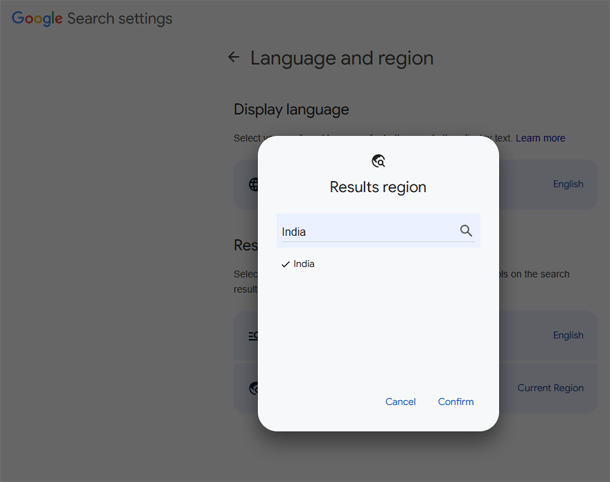 You can get to that option using Google Chrome (Desktop & Android) look at the bottom bar.

How-to Set Default Google Search Engine to google.co.in
Right now, you should realize that https://www.google.co.in will be redirected to https://www.google.com/ and thus you can not set your default search engine to Google India.
How-to Search Google India?
Chrome still offers an option (although not really suitable for everyone, you can create a shortcut that allows you to specifically search Search Google India.
In Chrome chrome://settings/searchEngines Add Site Search option, you can create a shortcut that forces Google Chrome to Search https://www.google.co.in/search?q=
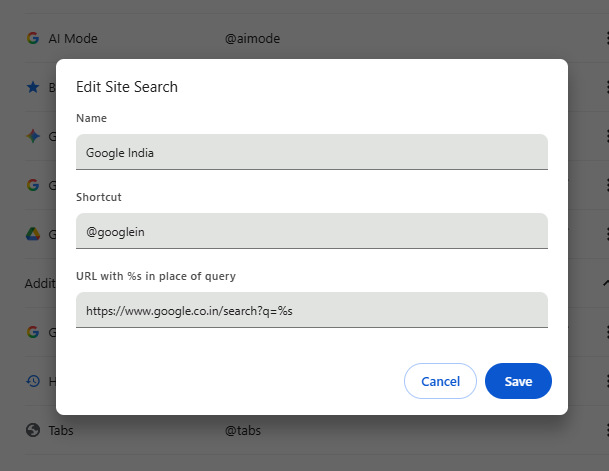
Video Tutorial: How-to Set Google.co.in as Your Default Search Engine in Chrome
What Else Changed?
Since there is outdated information about using URLs which bypassed Google’s regional settings. These may no longer function:
https://www.google.co.in/ncr (NO Country Redirect) will go to google.com
Using Google Chrome Setting to Set Google India as Your Search Engine Manually will NOT WORK
https://www.google.co.in/search?q= will go to google.com/search?q= if you are logged in to Google. If you are not logged in, it will still search https://www.google.co.in/search?q=
https://www.google.co.in/webhp (webhp stands for ‘Web Search Home Page’) will go to google.com/webhp
If Chrome chrome://settings/searchEngines onStartup keeps switching from .co.in to .com that is normal behaviour now (as of AUG 2025)
If Chrome chrome://settings/onStartup onStartup keeps switching from .co.in to .com that is normal behaviour now (as of AUG 2025)
If you enabled Show Home button in Chrome chrome://settings/appearance to open .co.in, but Chrome redirects to .com that is normal behaviour now (as of AUG 2025)
Check Back for More Updates
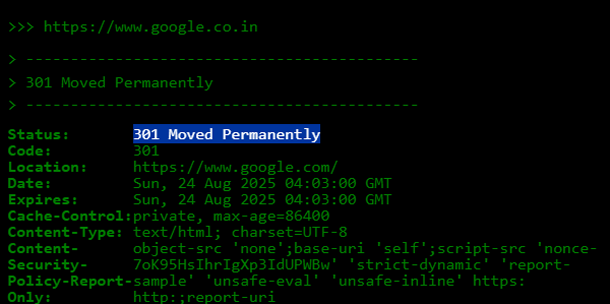 Since this is a major change, Google may (or may not) revert their Country Specific Search Options back to how they were. Revisit this page to see new updates.