Adding VideoObject Schema Markup can better aid search engines to understand your content. Here’s how to video tutorial.
Video Tutorial Adding Video Structured Data to YouTube Embedded Video
There are many plugins and or Apps that promise to add Structured Data Schema Markup to websites. If you are using Plugins or Apps to add Schema Markup to your website (even for video object markup), then, you maybe doing it wrong. Why?
- In most cases, most schema markup plugins or App will add invalid markup (for Google to recognize Structured Data on a web page, the markup code must be valid without errors).
- Structuring WebSite Data through nesting offers your website greater control about providing in-depth semantics of the entire website and web pages (for example: Product Markup LocalBusiness Markup all of which can be nested and extended by using additional data types).
A Website is your domain, and every other URL on your website can then be nested:
<html itemscope itemtype="https://schema.org/WebSite">
- example.com/about-us can now be AboutPage for the WebSite
- example.com/contact-us can now be ContactPage of the WebSite
Benefits: be it eCommerce Store or a typical LocalBusiness, you can now tie together different parts of a website telling Google “hey Google this About Us URL is About ABC Business. Or, for ContactPage here’s the Contact Details for ABC Business etc.). This is called Nesting an ENTIRE WebSite (no plugins can accomplish this, you must manually code the website thoroughly). Simply explore RankYa Structured Data tutorials.
As you can see the importance of nesting. Another basic example since most websites use Frequently Asked Questions (FAQ) section: adding FAQ to Product URL should be FAQ related to the specific Product you are marking up. You can do that starting from the HTML tag itself
<html itemscope itemtype="https://schema.org/Product">
Without doing so, FAQ schema markup code on its own would most certainly be a seperate schema code block confusing search engines as to what FAQ is about.
Video is Not the Main Content of the Page
We’ve actually created this blog post to share tips with RankYa followers facing Video page indexing issues for videos that are not the main content of the page in Google search console.
For YouTube embedded videos, this issue in Search Console about video not being main content of the page almost always correct reporting by Google search console. Meaning, there is nothing to fix in Search Console for YouTube embeds. And also, Google will show your YouTube videos in Search Engine Results Page.
Video Tutorial Highlights Video is Not the Main Content Issues
How To Add Video Structured Data to YouTube Embeds
Ideally for Search Engine Optimization, your aim is to guide Google to better understand your website, your YouTube videos can also take advantage of the latest Google Rich Results for video.
Download sample codes here: VideoObject YouTube Emded Schema Markup (.zip format)
JSON-LD Example for YouTube Embeds Schema Markup Structured Data
<script type="application/ld+json">{
"@context": "https://schema.org/",
"@type": "VideoObject",
"name": "YouTubeVideoTitleGoesHere",
"description": "YouTubeVideoDESCRIPTIONGoesHere",
"uploadDate": "2024-03-14T00:00:00+00:00Z",
"duration": "PT07M07S",
"url": "https://www.youtube.com/watch?v=CHANGEVIDEOID",
"contentUrl": "https://www.youtube.com/v/CHANGEVIDEOID",
"embedUrl": "https://www.youtube.com/embed/CHANGEVIDEOID",
"thumbnailUrl": "https://i.ytimg.com/vi/CHANGEVIDEOID/hqdefault.jpg",
"isFamilyFriendly": "TRUE"
}
</script>
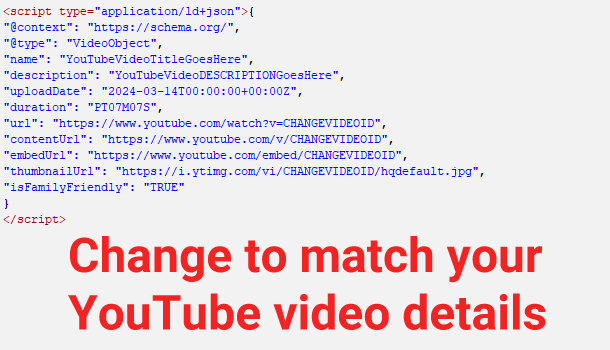 You can and should use sameAs on any links to your own YouTube channel.
itemprop="sameAs"
JSON-LD Example for Extending YouTube Embeds Schema Markup for a Business
What if you are publishing a blog post or article that contains your YouTube embeds? Then, you can add further information extending your blog post and tie the video to the blog post like so:
<script type="application/ld+json">{
"@context": "https://schema.org/",
"@type": "SocialMediaPosting",
"@id": "https://www.youtube.com/v/CHANGEVIDEOID",
"datePublished": "2024-03-14T00:00:00+00:00Z",
"author":{
    "@type":"Organization",
    "name":"BusinessName",
    "url":"https://www.example.com/"
  },
"image": "https://i.ytimg.com/vi/CHANGEVIDEOID/maxresdefault.jpg",
"headline": "YouTubeVideoTitleGoesHere",
"sharedContent":{
    "@type":"Blog",
    "headline":"BlogPostTitleGoesHere",
    "url":"https://www.example.com/URLofBlogPost/"
  }
}
</script>
JSON-LD Example for Extending YouTube Embeds Schema Markup for a Person
What if you are publishing a blog post or article that contains your YouTube embeds? Then, you can add further information extending your blog post and tie the video to the blog post like so:
<script type="application/ld+json">{
"@context": "https://schema.org/",
"@type": "SocialMediaPosting",
"@id": "https://www.youtube.com/v/CHANGEVIDEOID",
"datePublished": "2024-03-14T00:00:00+00:00Z",
"author": {
    "@type": "Person",
    "name": "John Smith",
	"email": "[email protected]",
	"url": "https://about.me/johnsmith"
  },
"image": "https://i.ytimg.com/vi/CHANGEVIDEOID/maxresdefault.jpg",
"headline": "YouTubeVideoTitleGoesHere",
"sharedContent":{
    "@type":"Blog",
    "headline":"BlogPostTitleGoesHere",
    "url":"https://www.example.com/URLofBlogPost/"
  }
}
</script>

I always wondered how to improve my YouTube embeds for better SEO. The step-by-step instructions were super helpful, especially the part about using schema.org markup. Can’t wait to implement these tips on my site. Great tips.
The schema.org markup is definitely important in today’s Google search results. Quick tip: after implementing Structured Data, test your page with Google’s Rich Results Test Tool to make sure everything’s picking up correctly. Happy optimizing!
Great guide for adding video structured data I didn’t realize how much it can impact Google SEO for embedded YouTube videos.
Great post about popular aspect of web pages in 2026 because almost all of them have YouTube embed video. I always wondered how to optimize my YouTube videos for better SEO. Your advice on adding video structured data I wasn’t aware of but now will use it.
Structured Data when implemented correctly will help all search engines better understand the content of a website. Furthermore, with all the new changes in Google search features due to Artificial Intelligence (AI Mode) Gemini integration of Google products, adding structured data will help AI SEO as well as assist the website take advantage of Google Rich Results.
This means, in 2026, all websites using YouTube embeds should utilize Video Structured Data as recommended by Google.
This post is very helpful as I’m new to schema markup but excited to implement video structured data in my YouTube embeds to improve my SEO rating. Thanks for breaking down the process so clearly for a newbie like me.
Great post! I’ve been looking for a clear guide on how to implement video structured data for my YouTube embeds. This step-by-step instructions were very helpful and easy to follow. Can’t wait to boost my video SEO with this.
Thank you for the comment Raj, and yes, Structured Data is becoming very important for Google search engine optimization due to Rich Results and all the new changes Google has made (e.g. AI Mode) for 2026.