What is WebMCP?
Model Context Protocol (WebMCP). The WebMCP API enables web applications to provide JavaScript-based tools to AI agents. Proposed WebMCP will replace DOM Scraping, meaning instead of an AI agent parsing HTML, reading accessibility trees, or taking screenshots to guess what buttons or forms do, the website with WebMCP will explicitly declare what actions are available and what inputs they require.
Adding WebMCP to your website enables Agentic AI systems to dynamically discover and interact with your specific services and capabilities. While a full server-side deployment offers deep integration, you can also implement a client-side script that registers your custom tools directly into the browser’s model context, bridging the gap between your on-page data and AI assistants.
Implementing the Client-Side Registration Script
The core of this approach involves executing a JavaScript function that polls for the availability of the `modelContext` API and registers a structured tool when it becomes active. This allows you to define exactly what your website offers in a format AI understands.
- Wrap your registration logic in an immediately invoked function expression (IIFE) to prevent scope pollution.
- Implement a polling mechanism (using `setInterval`) to check for `window.modelContext` or `navigator.modelContext`, as the AI environment may inject this object asynchronously.
- Set a maximum number of polling attempts to avoid infinite loops if the user agent does not support the protocol.
Defining the WebMCP Tool Schema
Once the context is detected, you must define the tool using a strict JSON schema. This schema acts as the interface contract for the AI.
- Provide a clear, unique `name` for your tool (e.g., “get_rankya_services”).
- Write a precise `description` outlining exactly what data the tool returns.
- Construct the `inputSchema` specifying the expected parameters. For example, if you offer various services, define an `enum` of acceptable categories so the AI knows how to filter the request.
- Implement the `execute` function to process the AI’s input and return the corresponding data array or object.
Synchronizing with JSON-LD Structured Data
To maximize Answer Engine Optimization, your WebMCP tool output should mirror the structured data already present on your page. This dual-layer approach reinforces your entity definitions.
Ensure the data returned by your `execute` function logically maps to the `ProfessionalService` and `Offer` items declared in your `< script type="application/ld+json" >` block. When an AI agent reads the JSON-LD to understand your page context and uses the WebMCP tool to fetch specific details, the consistency across both data sets establishes high trust and topical authority.
How-to Test a WebMCP Integration Functionality
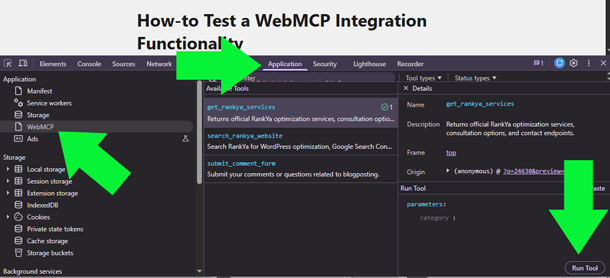
Deploy the script within the `< head >` or just before the closing `< /body >` tag of your HTML document. You can verify the execution by simulating the `modelContext` object in your browser’s developer console and triggering the `registerTool` method to ensure your schema and execute functions resolve without errors.
To test: Press F12 for web developer toolbar > Application > WebMCP > Select Tool > Run Tool
Frequently Asked Questions
Do I need a dedicated server to run WebMCP?
You can run WebMCP using edge network solutions like Cloudflare Workers, which eliminates the need to manage and host a dedicated physical server.
Is WebMCP compatible with WordPress?
Yes, WebMCP can connect directly to WordPress by utilizing the built-in REST API endpoints to fetch content and execute commands securely.
What are 2 Ways I can Implement WebMCP?
WebMCP can work through server-side integration by creating and configuring the Server Worker. Or client-side integration, by using HTML and JavaScript that registers your WebMCP codes. Which you choose will depend on your website or app requirements.