
Google My Activity is a centralized dashboard where users can view, manage, control, or delete their activity, YouTube watch history, and location data collected across Google services. My Activity section provides direct control over data privacy settings, allowing Google account holders to customize what information is saved to their Google Account and adjust personalization features.
Google has recently made major changes to its Data & Privacy and Personalization settings. Take a look at the image below to see what some of these new options are.
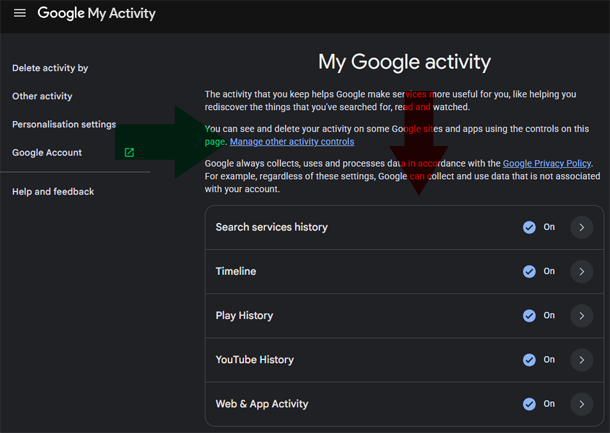
Having spent 10,000+ hours in digital trenches analyzing search guidelines and webmaster tools, it becomes clear that understanding data flow is essential. True digital mastery requires an integrity-driven approach to how information is stored, processed, and utilized by search engines, as well as for modern Answer Engine Optimization. Here’s the full guide to controlling your Google Activity.
Managing Activity Controls and Search History
Activity Controls dictate the specific types of data saved to an account. Keeping track of this data helps refine search results and improves the accuracy of your interactions with Google products. You can adjust the following core areas:
- Search services history
- Timeline History
- Play History
- YouTube History (YouTube interactions are here)
- Web and App Activity
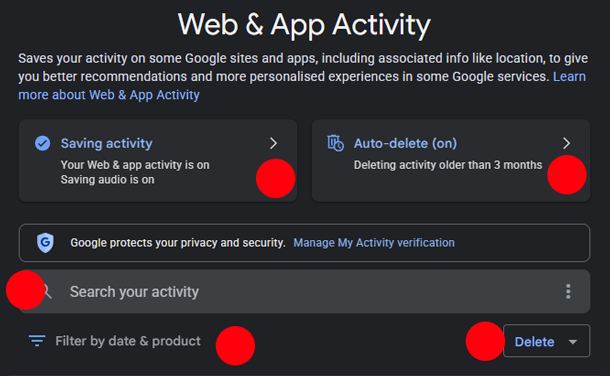
Video Tutorial: How to Access and Manage Google My Activity Controls on Android
How-to Clear All Google Account Activity History (Step-by-Step Guide)
Video Tutorial: How-to Clear All Google Account Activity History (Step-by-Step Guide)
ANDROID DEVICE: open any google app and press on your profile icon “Manage Google Account”
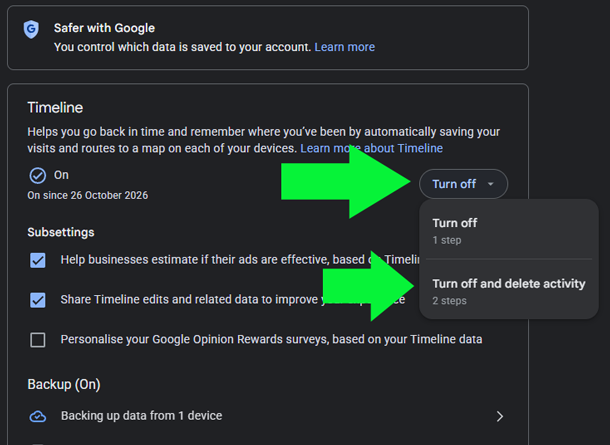
NOTE: Certain Google Products must be TURNED OFF before you can clear your activity history.
- Login to your Google Account myaccount.google.com
- Navigate to the Data & Privacy tab from the left-hand menu.
- PRESS on My Actvity tab
- Select any of your activity (for example: Search services history, Timeline, Google Play, Web & App History, or YouTube History).
- Find the DELETE Button — Select ALL TIME — Click Next — Confirm Delete
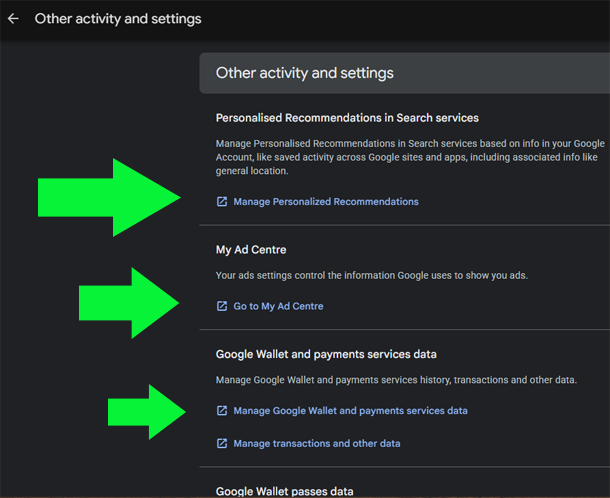
Must Check ‘Other activity and settings’
Although Google’s latest settings are easy to use and plenty of controls, visit the Other Activity section to fully manage and control your data. For example: Gemini Apps activity, Google Workspace search history (including gmail), Chrome History for synched devices, Media likes and dislikes on Google TV, and ALL your Google Account activity, are accessible through Other activity and settings.
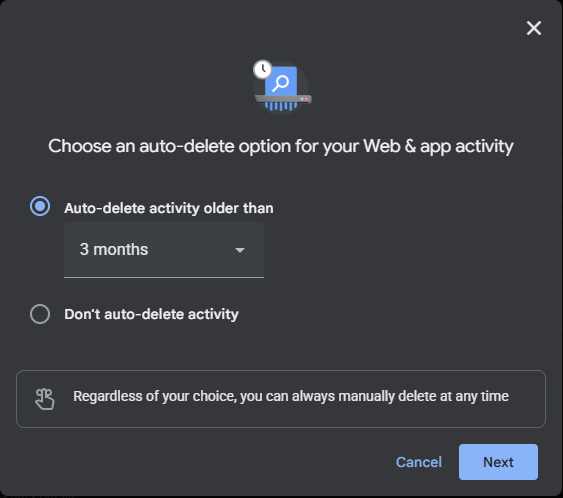
Video Tutorial: How-to Automatically Delete Your Google Activity
Video Tutorial: How-to Delete Google Wallet & Google Pay Activity History (Android)
Video Tutorial: How to Delete Google Timeline Data & Location History (Step-by-Step)
NOTE: there are 2 sets of Timeline Data Google keeps.
- Per your phone device using Google Maps
- In your Google Account “My Activity > Timeline” settings.
Customizing Personalized Ads
The My Ad Center section connects directly with activity data to serve personalized ads. Modifying these preferences allows you to restrict sensitive ad categories and maintain stricter boundaries around your commercial profile.
Your Privacy Your Right
Although internet is a free open-source of information. Search engines such as Bing and Google are the gatekeepers. Couple that with smartphones in every pocket sharing your usage data with location information turned on. Some businesses track our every move without us realizing the consequences of this. Basic example:
I’ll say no more about that, as I specialize in, and rely on Google to survive as a small business owner in Australia just like all businesses.
Since Google is making new changes to its privacy practices by giving its users geater control of how-to control their privacy, use these activity controls to better manage your online footprint.
Working with other organizations Google is moving towards “consent first approach to its tracking cookies”. Basically, in the near future, Google Chrome may completely phase out third-party cookies which are used for tracking internet users. No doubt that Google policies on privacy is improving, but non-the-less, it is you as a Google Account holder to understand these settings.
Whenever you have control over your privacy “hold on to it dearly.”.