
YouTube is owned by Google which is owned by Alphabet Inc. Here’s what Google says about YouTube accounts:
If you choose to permanently delete your YouTube channel, we may have a harder time recovering your account.
Knowing that, there could be many different reasons for you to delete a YouTube channel, so, here’s how you can close a YouTube channel in 2025.
Video Tutorial Showing How-to Delete YouTube Channels in 2025
Steps to Follow for Deleting YouTube channel
- Sign in to YouTube Studio.
- From the left sidebar, select Settings.
- Select Channel and then Advanced Settings
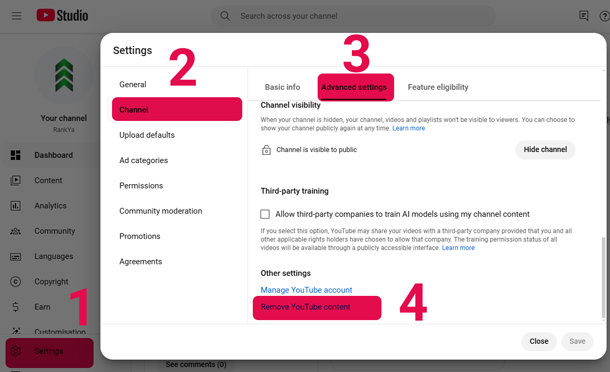
- At the bottom, select Remove YouTube Content. If you’re asked to, enter your sign-in details.
- In the next screen > Select > I want to permanently delete my content.
- Select the boxes to confirm you want to delete your channel
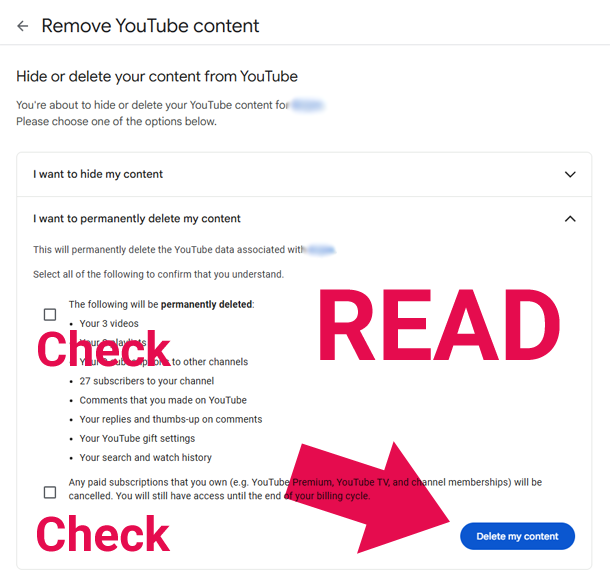
- Select Delete my content button.
Good to know: when a Google Account is created, Google then automatically creates a YouTube channel attached to that main Google Account. Also, you can create multiple YouTube channels within/under 1 main Google Account (these are called Brand Accounts).

I need to recover my permanently deleted YouTube channel
Once a YouTube channel is permanently deleted, all data, including videos, comments, and other content, is permanently removed and cannot be retrieved. Having said that: if you have used Google TakeOut then that is your backup.