Adding Cloudflare Turnstile CAPTCHA manually can improve your WordPress site’s performance by reducing plugin bloat while still effectively blocking automated spam bots trying sneak in through your Contact Form 7.
Video Tutorial: Setting Cloudflare Turnstile CF7
Sign up for Cloudflare
If you don’t already have a Cloudflare account, you’ll need to create one to use their CAPTCHA feature (it is free to create a cloudflare account and it is free to use Turnstile).
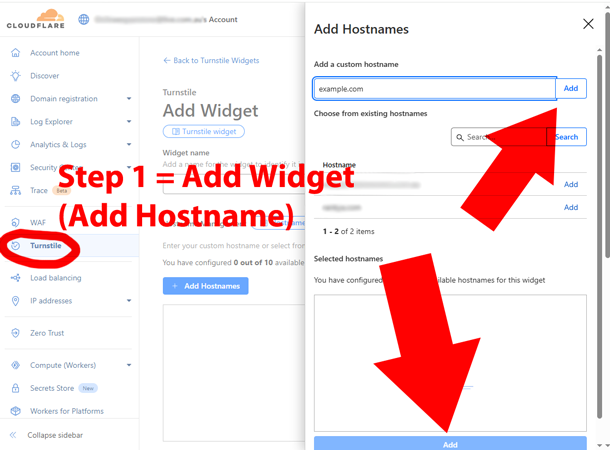
Create a Turnstile Widget to get Site Key and Secret Key
Within your Cloudflare dashboard, navigate to the Turnstile section and create a new Widget to get site key and secret key.
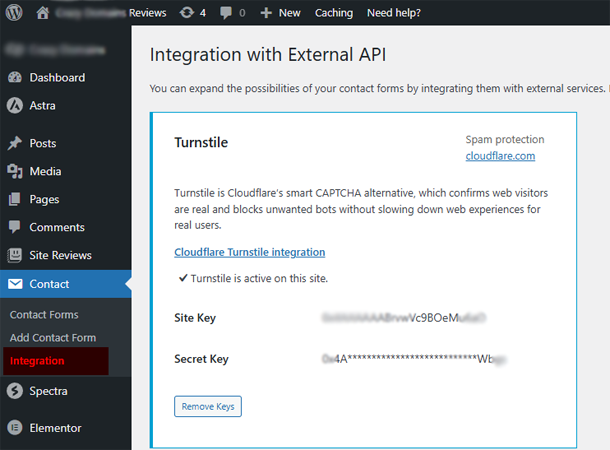
Add Turnstile Keys to Contact Form 7 Turnstile Integration
Within your WordPress dashboard, navigate to the Contact Form 7 > Integration > Turnstile "Press on Setup integration".
Using Contact Form 7 ONLY on Contact Page?
Add this code to your WordPress Theme > functions.php as it will ensure that turnstile script does not load on other parts of your website (change the page name to match your website contact page name).
function rankya_load_turnstile_only_on_contact_page() {

    if( !is_page('contact') ){wp_dequeue_script( 'cloudflare-turnstile' ); }
}

add_action( 'wp_enqueue_scripts', 'rankya_load_turnstile_only_on_contact_page', 20 );
Just because WordPress offers countless free plugins does not mean that you should use them, when you can easily add the same functionality to your website by making minor code edits.
Video Tutorial: Simple Cloudflare Turnstile Plugin
By taking this approach, you can enhance the security and user experience of your WordPress site while keeping those annoying spam bots at bay.