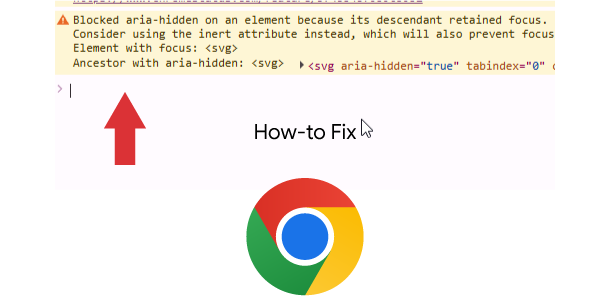
Seeing Google Chrome message:
Blocked aria-hidden on an element because its descendant retained focus. The focus must not be hidden from assistive technology users. Avoid using aria-hidden on a focused element or its ancestor. Consider using the inert attribute instead, which will also prevent focus. For more details, see the aria-hidden section of the WAI-ARIA specification at https://w3c.github.io/aria/#aria-hidden
The fix could be as easy as adding simple CSS that removes focus from HTML element (HTML Element in your particular case will be different). Or the solution could be complex as creating a Javascript code.
#cm #c-bns span {pointer-events: none;}
In a Nutshell
The “Blocked aria-hidden” error means your website hid a pop-up box but accidentally left the visitor’s controls trapped inside that invisible box.
It’s like the stage curtain coming down at a show, but the spotlight is still shining on the main actor behind the curtain. The audience (your visitor) is locked out and can’t see what’s happening.
Fixing this glitch is crucial for making sure your website is welcoming and easy to use for everyone, especially visitors with disabilities who rely on assistive technologies.
Why you must fix it? Improving User-Experience and Accessibility is part of Website Optimization and Google rankings factor.
Updated Video Insights
Updated Video Tutorial for Fixing aria-hidden issues
NOTE: when running Google AdSense ads with our WordPress Pressidium Cookie Consent plugin, we’re still getting this error because plugin authors have coded their plugin incorrectly. Normally, the HTML button element itself should receive focus, not a HTML span that is inside the button element. The tabindex="-1" on the span is a clear sign that the plugin’s author is doing some custom, and in this case faulty, focus handling. Samples below may work for your particular setup.
What Does tabindex=”-1″ Do in HTML
- It removes an element from the natural keyboard navigation order (you can’t get to it by pressing the Tab key).
- It allows that element to be focused on using JavaScript code (using the .focus() method).
Universal JavaScript code for fixing this issue. Use this code to fix it.
Example 2 for Universal JavaScript code for fixing this issue. Use this code to fix it.
If using WordPress Pressidium Cookie Consent plugin that is causing this issue. Use this code to fix it.
This is another example that fixed the latest Pressidium Cookie Consent plugin causing this issue on button clicks.
document.addEventListener('DOMContentLoaded', function() {
    /**
     * This function's only job is to move the browser's focus out of the
     * now-hidden cookie modal and back to the main document. This fixes
     * the "aria-hidden" accessibility error.
     */
    function fixFocusAfterConsent() {
        // A short delay can sometimes be necessary to ensure the library has
        // finished its hiding animation before we move the focus.
        setTimeout(() => {
            console.log("A consent event was detected. Moving focus to the page body.");
            // Move focus to the main page body to prevent it being trapped.
            document.body.setAttribute('tabindex', '-1');
            document.body.focus();
            document.body.removeAttribute('tabindex');
        }, 100); // 100ms delay
    }
    // Listen for the events that the Pressidium script fires when consent is given or changed.
    window.addEventListener('pressidium-cookie-consent-accepted', fixFocusAfterConsent);
    window.addEventListener('pressidium-cookie-consent-changed', fixFocusAfterConsent);
});
Below insights are for SVG elements causing this accessibility issue for aria-hidden on an element because its descendant retained focus.
<svg> <svg aria-hidden="true" tabindex="0" viewBox="0 0 448 512" xmlns="https://www.w3.org/2000/svg">…</svg>
Video Tutorial for Fixing Blocked aria-hidden on an element because its descendant retained focus
JavaScript Code to Fix Blocked aria-hidden on an element because its descendant retained focus Errors for SVG
Wrap this code in < script > tag. JavaScript (will work for react angular or other bootstrap js library). Basically, this issue is related to visitors using Assistive Technology and thus SVG elements with focus and tab-index set to 0 is incorrect coding for the assistive technology devices.
Download sample codes here (.zip format)

document.addEventListener('DOMContentLoaded', function() {
// Select all SVG elements that have both 'aria-hidden="true"' AND 'tabindex="0"'.
// The attribute selector '[attribute="value"]' is used for precise targeting.
const problematicSVGs = document.querySelectorAll('svg[aria-hidden="true"][tabindex="0"]');
// Iterate over each found SVG element.
problematicSVGs.forEach(svg => {
// Remove the 'tabindex' attribute from the SVG element.
// This ensures that the SVG, which is already marked as hidden from accessibility
// trees, does not unexpectedly receive keyboard focus.
svg.removeAttribute('tabindex');
console.log('Removed tabindex="0" from an aria-hidden SVG:', svg);
});
// Optional: You might also want to log a message if no problematic SVGs were found.
if (problematicSVGs.length === 0) {
console.log('No aria-hidden SVGs with tabindex="0" found. All good!');
}
});
WordPress Code to Fix Blocked aria-hidden on an element because its descendant retained focus Errors for SVG
Place in WordPress Theme functions.php and replace with your Theme’s JS handle.

function rankya_do_fix_svg_blocked_aria_hidden() {
wp_add_inline_script(
'astra-theme-js', // Replace with a script handle your WordPress theme already uses, e.g., 'astra-theme-js' 'jupiter-core-js', or even 'jquery', or register a new one.
'document.addEventListener(\'DOMContentLoaded\', function() {
const problematicSVGs = document.querySelectorAll(\'svg[aria-hidden="true"][tabindex="0"]\');
problematicSVGs.forEach(svg => {
svg.removeAttribute(\'tabindex\');
console.log(\'Removed tabindex="0" from an aria-hidden SVG:\', svg);
});
if (problematicSVGs.length === 0) {
console.log(\'No aria-hidden SVGs with tabindex="0" found. All good!\');
}
});',
'after' // 'after' ensures it runs after the main script
);
}
add_action( 'wp_enqueue_scripts', 'rankya_do_fix_svg_blocked_aria_hidden' );
Still Unsure?
You can hire RankYa (fully qualified web developer with expert skills in HTML CSS JavaScript PHP) to identify the right solution for your website and create the necessary codes that can help you fix this problem. Contact me here (Mention ‘Aria-Hidden Issue’).